Skip to content

What's inside

Everything Nuri does, for both of you.

Two modes in one app. Your parent gets a screen with nothing to learn. You get to stop guessing how their day went. Every feature below is written from both sides, and the switch picks which side you read.

Nuri Plus is the paid plan. A few of the things below are part of it. The app tells you which before you use them, and medication reminders are never limited.

Whose side of Nuri do you want to see?

Their phone

The home screen, and not much else

No new gadget, no hub, nothing to plug in. It runs on the phone they already own.

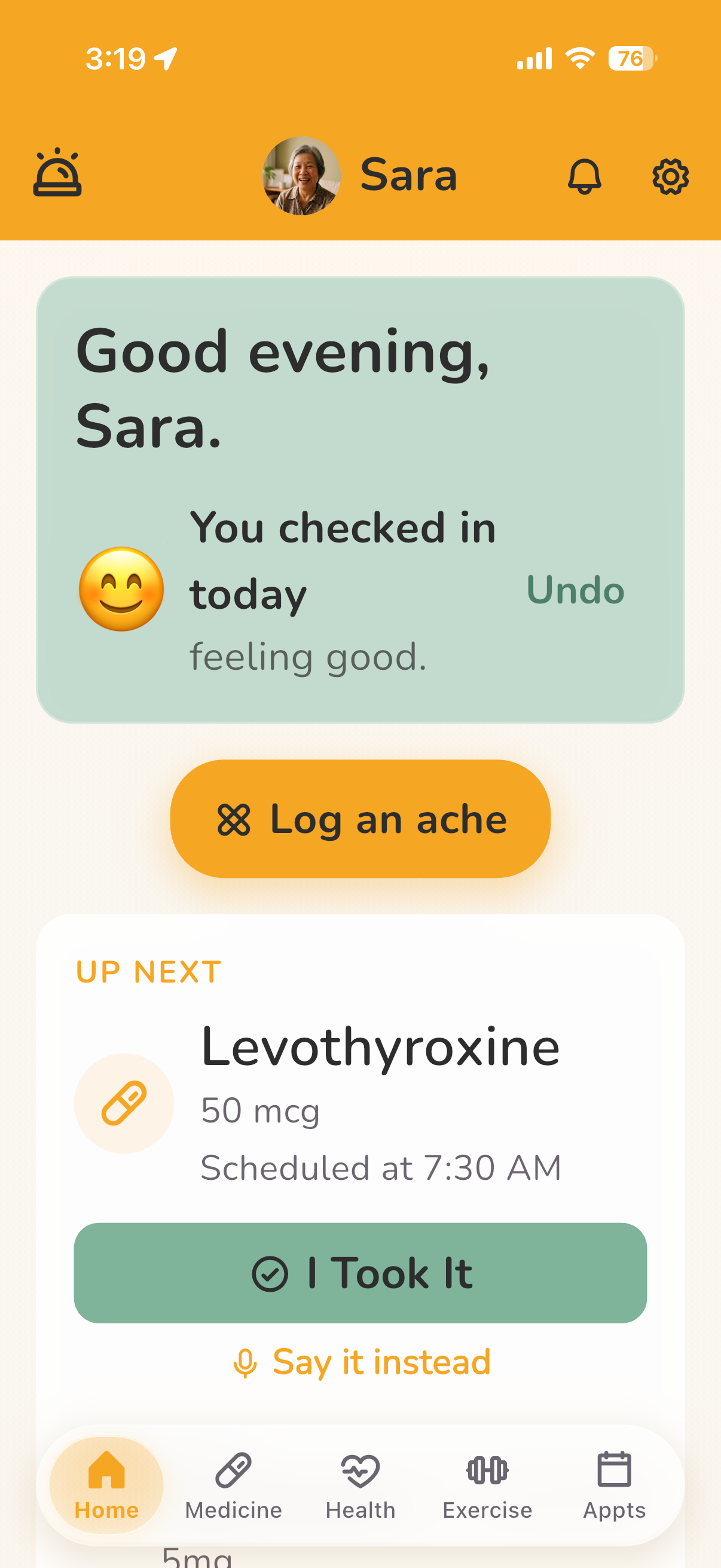
The Nuri home screen on an iPhone: a greeting, a completed daily check-in, a Log an ache button, and the next dose due with a large I Took It button.
Their phone, home

Their phone

What you see

This screen is not on your phone.

Their home screen is theirs. What reaches you is what they do on it: the check-in, the dose, and the SOS if they ever press it.

Why I built it It looks the same on Monday as it did on Sunday. That is the part that makes an 82-year-old keep using it.
Their phone

What your parent sees

One screen. The next medicine, a one-tap check-in, somewhere to log an ache, and help if they need it.

A greeting, today's check-in, the next dose with its button, and a quick-call list of the doctors and pharmacies they have saved. The emergency button sits in the bar at the top of every screen.

Why I built it It looks the same on Monday as it did on Sunday. That is the part that makes an 82-year-old keep using it.
The daily check-in

What you see

One line, once a day.

Their answer appears on your home screen as a single line, and it sets the colour of the card so a bad day is visible before you read it.

The daily check-in

What your parent sees

Three buttons, or just say it.

How are you today, answered with Great, Okay or Not great. There is a microphone if speaking is easier than tapping.

Free-form speech is understood on Nuri Plus.

Getting connected

What you see

Nuri does not open until you are connected.

Your side of the app is built around someone, so it waits until a parent has accepted. You share your Nuri ID and they enter it.

A Nuri ID is six characters, like A2K-7X9. It never expires.

Getting connected

What your parent sees

Their app works on its own from day one.

Medicines, reminders and the check-in all work before anyone is connected. Family is something they add, and something they can remove.

Making it readable

What you see

There is no setting on your side.

Text size lives on their phone and belongs to them. You cannot change how their screen looks from yours.

Making it readable

What your parent sees

Three sizes, set on their own phone.

Small, Medium and Large, with a bold-text switch and a high-contrast mode. It changes their app and nobody else's.

Both modes

Medicines, handled

Each dose is a large row with one button on it. Everything else hangs off that.

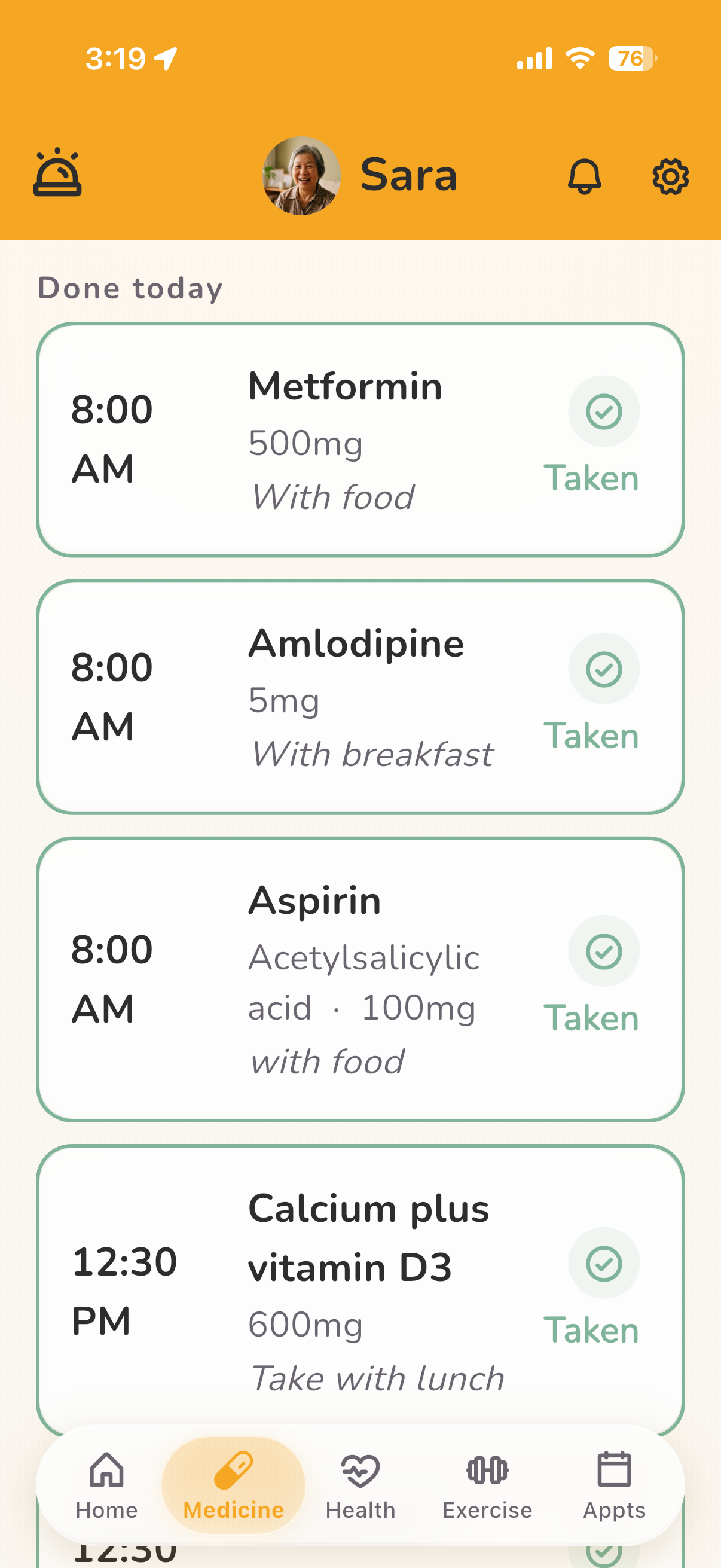
The Nuri medicine list on an iPhone, one large row per dose showing the time, the medicine, the instruction and whether it has been taken.
Their phone, medicines

A dose

What you see

They tap “I took it” once. You see it from wherever you are.

Their day shows Up next and Done today, with a daily goal ring.

Why I built it This is the reason most families install Nuri, so it is the part I have been hardest on.

A dose

What your parent sees

One large row, one button.

Each dose opens to a single Confirm Dose button. Once it is logged, that button reads Already taken and locks, so the same dose cannot be taken twice by accident.

Why I built it This is the reason most families install Nuri, so it is the part I have been hardest on.

After a dose

What you see

This one is not yours to answer.

You see what they reported afterwards in the health diary. You are not asked the question and you cannot answer it for them.

After a dose

What your parent sees

How did you feel after taking it?

After confirming a dose, Nuri asks. They can tap Fine, or pick a symptom and say whether it was mild, moderate or severe.

If they say severe, Nuri tells them to use SOS or call family.

A missed dose

What you see

You see it was missed, without asking.

A dose counts as missed one hour after its time, and it shows on their day. If they tell you on the phone that they did take it, you can mark it yourself.

A missed dose is one of the three things that reaches you as an alert.

A missed dose

What your parent sees

The row says Missed, and the button still works.

A late dose can still be confirmed from the same row. Once it is, it moves to Done today.

Safety checks

What you see

Nuri checks a new medicine against the rest, and warns you before you save it.

Against their other medicines and the conditions on their record.

On every plan.

Safety checks

What your parent sees

The same check runs when they add one themselves.

They can add a medicine by typing it, photographing the label or saying it, and Nuri checks it against the rest before it saves.

Your phone

One look, and you know

It replaces the worried text you send at nine every night.

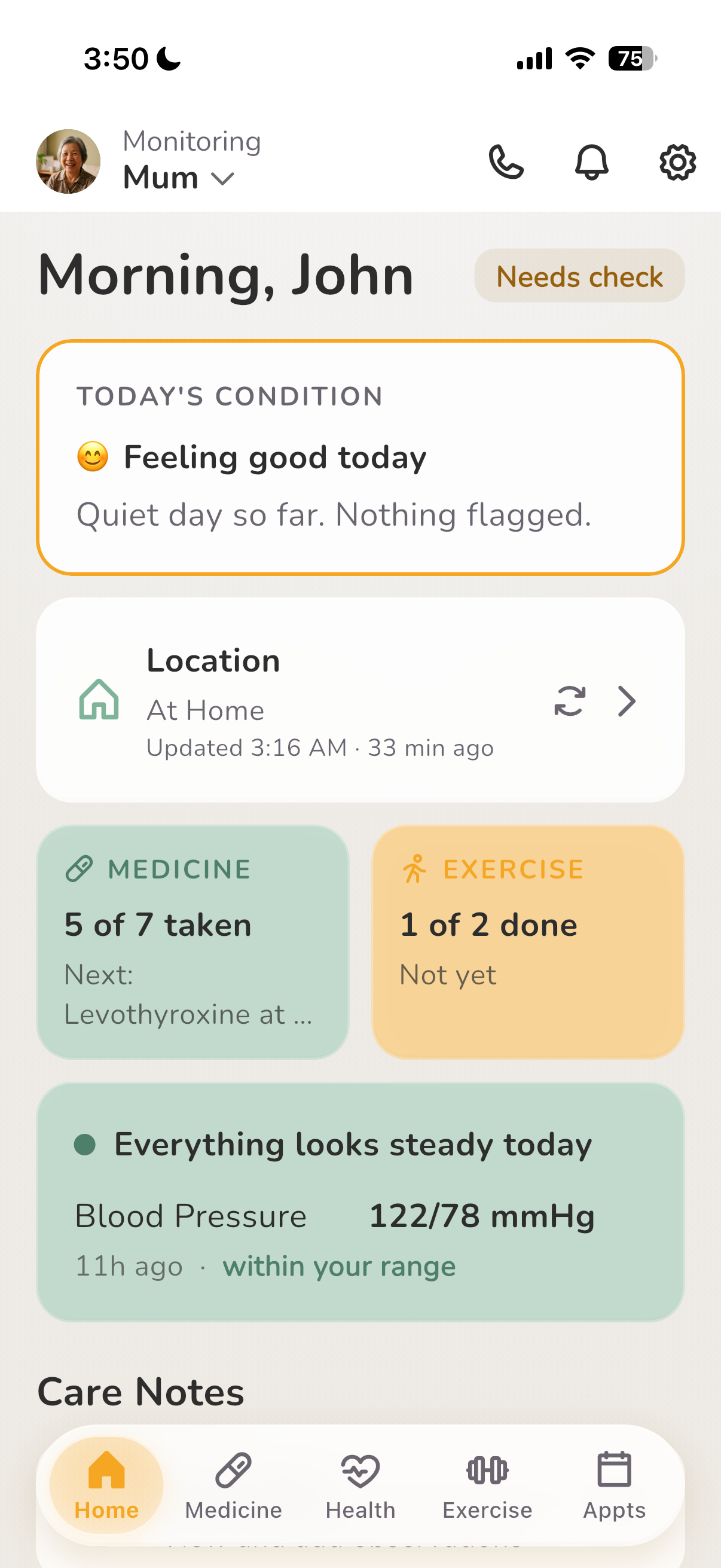
The Nuri family overview on an iPhone, showing how the day is going.
Your phone, home

The overview

What you see

Open it, see the day, close it. Doses taken, how they said they felt, anything that needs a hand.

You ring to see how they are, and spend the whole call checking up on them instead. The overview is meant to take that job off the call.

Why I built it Families want to help with the basics, and there was no way to do it without either nagging or hovering. This is my attempt at a third option.

The overview

What your parent sees

There is no overview on their side.

Their phone shows their own day, one thing at a time: the check-in, the next dose, somewhere to log an ache. The summary of it exists on your phone only.

Why I built it Families want to help with the basics, and there was no way to do it without either nagging or hovering. This is my attempt at a third option.

Alerts

What you see

A missed dose, an emergency, a reading outside the range you set. Nothing else gets through.

Either you hear nothing for three days, or you are in a family chat that never stops. Nuri sends the three things above and keeps the rest off your phone.

Sent to your phone, and kept in the Alerts tab if you want to look back.

Alerts

What your parent sees

The alerts are yours. Their phone gets none of them.

What their phone shows them is their own reminders: medicines, appointments and the check-in.

The long view

The pattern behind the day

A month at a glance: how they felt, what hurt, what got logged.

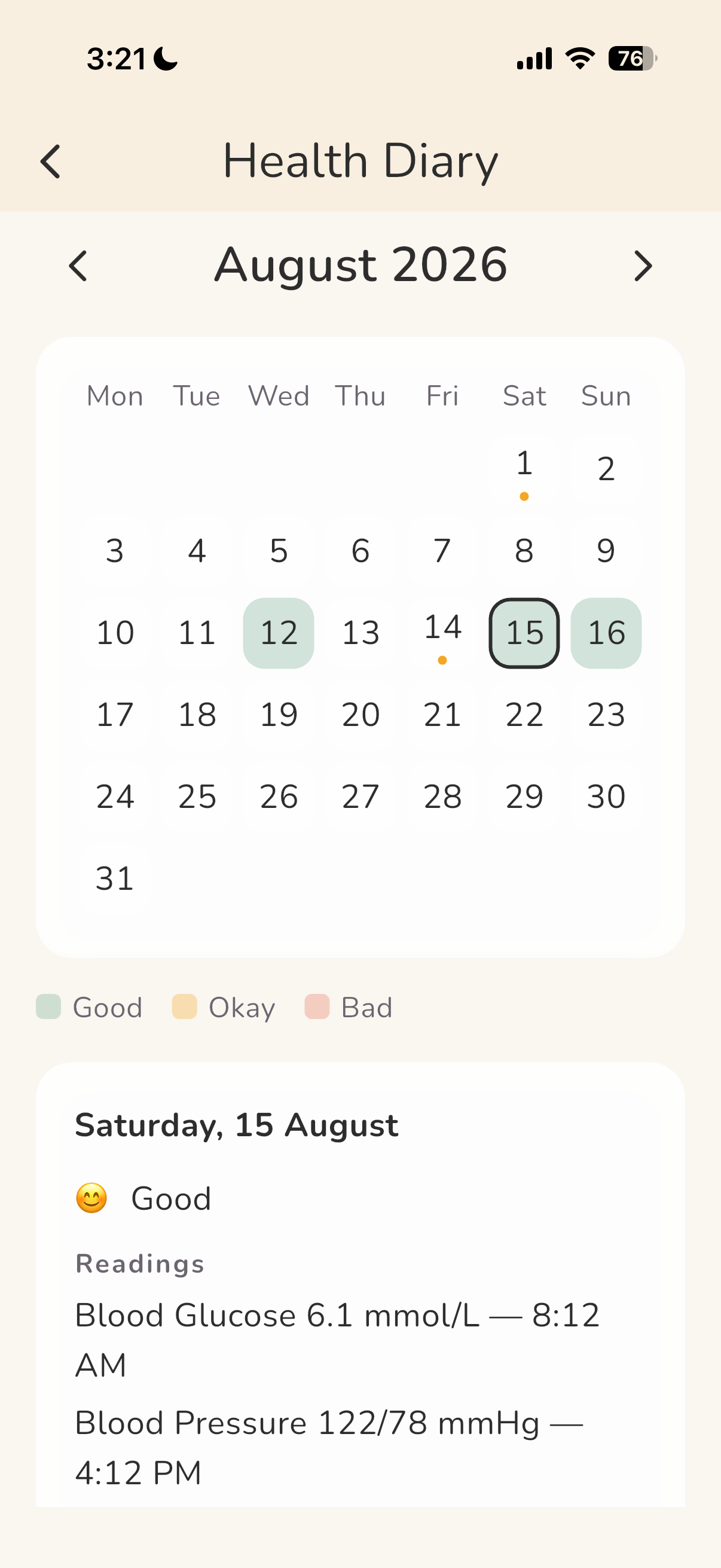
The Nuri health diary on an iPhone, showing a month of check-ins on a calendar.
Your phone, diary

The health diary

What you see

A month on one screen, so you walk in able to say “this started about three weeks ago”.

Fifteen minutes with the doctor, and the best you could offer was that they have been a bit off lately. The diary has how they felt, what hurt and what got logged, day by day.

The health diary

What your parent sees

The same month, on their phone.

The diary is the one screen that is identical on both sides. They can open it themselves, and they can show it to the doctor without you in the room.

Safety

When something goes wrong

The two things families ask about first.

An emergency

What you see

You are told. You do not press it.

The SOS exists on their phone only. What you get is the alert when it happens, and their location with it.

An emergency

What your parent sees

One tap. No holding it down.

An emergency button at the top of every screen, then a sheet offering Call Ambulance, Send silent SOS, or somebody they have saved, with no countdown and nothing to hold. If the alert cannot be sent, Nuri says so and tells them to call, rather than leaving them reassured for nothing.

Reaching family is inside that sheet, not on the home screen.

Getting home

What you see

Their location reads “At home” instead of a map pin.

You do not want to ask where they are. You want to know they got back.

Most recent location only, never a trail, and anything older than seven days deletes itself.

Getting home

What your parent sees

They switch it on. They can switch it off.

Sharing is a setting on their own phone, and only they can turn it on or off. What you get to see is the most recent location, and nothing older than seven days.

The rest of it

The parts that just have to work

  • Three text sizes, a bold-text switch and a high-contrast mode.
  • English, Chinese, Malay and Tamil.
  • The daily check-in is a row of faces. One tap, or say it out loud.
  • Log an ache: what kind of pain, where it is, and how bad.
  • The exercises their doctor or physio gave them, with reminder times.
  • Add a medicine by typing it, photographing the label, or saying it.
  • A refill warning while there is still time to do something about it.
  • Blood pressure, blood sugar and weight, kept together. On every plan.
  • Appointments: add a visit once, and you are both reminded.
  • Doctors and pharmacies in one list, one tap to call.
  • Who gets told what: primary, secondary, or emergency only.
  • Keeps working on a bad connection, and sends what you logged when it returns.
  • A plain-words summary of the last stretch of check-ins and doses.
  • Export everything Nuri holds, whenever you like, without asking us.
  • Connect the two phones with a Nuri ID, and one of you approves the link.
  • Sign in with email, phone number, Apple or Google.

Not built yet

Wearable sync

Heart rate, sleep and step data from a watch would sit nicely alongside the daily check-ins, and we want it. It is not in the app today. We would rather say that than let you find out after you have paid.

Bring Nuri home.

Set it up with your parent this weekend. It takes an afternoon, and it works on the phone they already own.